Usage, caching, cost estimates, and turn budget
What it’s for
Section titled “What it’s for”Usage stats help you understand “which agent, which turn, and why consumption went up”. Hive records the token data returned by the runtime and combines it with model prices to estimate cost. It isn’t an official bill from the model service, and it isn’t an auto-charging account.
To control spending, limit task scope and parallelism first, then watch real usage. Hive’s turn budget is a brake on agents waking each other up, not a hard dollar cap.
Step 1: Find per-turn and room stats
Section titled “Step 1: Find per-turn and room stats”- Open “Agent tasks” and select a turn to see its details and usage.
- Check input, output, cache hit rate, session size, and whether there’s a large cache write alert.
- At the bottom of the tasks panel, find “Usage · this room” and choose 24 hours, 7 days, or 30 days.
- Check consumption by agent, by date, and by recent large cache writes, rather than only looking at the total.
Failed, stopped, and result-unknown turns are recorded as usual as long as runtime usage was obtained. Stopping a task doesn’t erase model consumption that already happened, and the current turn may not be fully recorded while it’s still running.
Step 2: Understand the four token buckets
Section titled “Step 2: Understand the four token buckets”| Metric | Meaning | What it doesn’t mean |
|---|---|---|
| Uncached input | Input tokens not counted as cache reads or writes | Not the number of characters you typed |
| Cache write | Tokens the runtime reports as newly created or rewritten cache | No guarantee the next turn will hit it |
| Cache read | Input tokens the runtime reports as cache hits | Not necessarily free; depends on service pricing |
| Output | Output tokens returned by the model | Not the number of characters visible on the page |
Total input is the sum of the three input buckets. Runtimes use different raw fields, and the Bridge normalizes them; don’t add a provider’s raw “total input” to the cache fields, or you’ll double count.
Cache hit rate is cache reads as a share of total input. Session size shows the observed context peak, along with the context window if the runtime provides it; don’t read it as disk usage on your machine.
Step 3: Configure prices and check estimates
Section titled “Step 3: Configure prices and check estimates”In the stats area, expand “Prices and alerts” and set four unit prices for each recorded model: uncached input, cache write, cache read, and output, in “USD per million tokens”.
Estimated cost (USD) = (uncached input × input price + cache write × write price + cache read × read price + output × output price) / 1,000,000For example, with purely fictional teaching prices: 1,000 uncached input tokens at $2 per million and 500 output tokens at $8 per million, with everything else zero, the estimate is $0.006. This isn’t a quote for any real model.
- If a price is configured for the model, the price set in this browser is used first.
- Without a price, the runtime’s self-reported cost is tried; Claude Code’s self-reported cost is also an estimate, and Codex doesn’t report cost.
- If neither is available, the amount is unknown, not zero. The summary notes that some models aren’t counted, so don’t treat an incomplete total as the full cost.
- Prices and alert settings are saved only in the current browser and don’t sync to other devices; the usage stats themselves are stored by the Server.
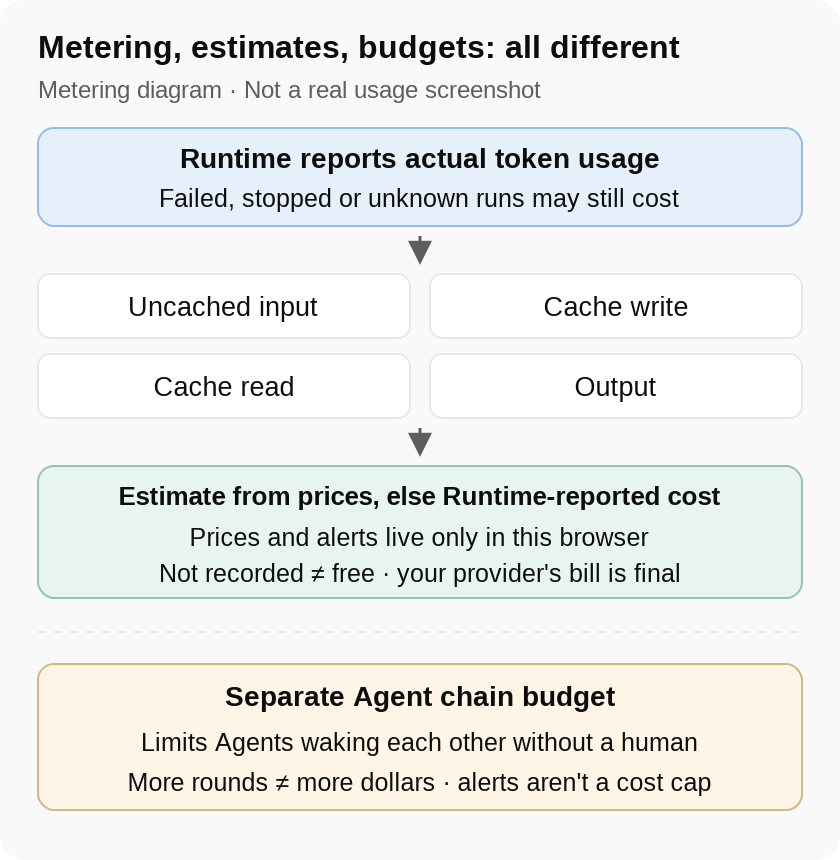
This is an original metering diagram, not a real stats screenshot. Token observation, cost estimation, and the turn budget are three different things.
Why the cache suddenly gets rewritten
Section titled “Why the cache suddenly gets rewritten”Task details separate observed facts from “possible causes”, such as a new session, a resumed session, the gap between requests, and the cache write type. Only when no lifetime was directly observed does it use “Assumed cache lifetime” from settings to help explain.
- First check whether it’s a new session or a resumed one.
- Check whether the gap comes from model request times or is estimated from when the previous turn ended.
- Check whether a cache write type was actually observed; don’t treat a guessed cause as provider confirmation.
- If the session has grown noticeably, write down the conclusions you need first, then have someone with permission start a “New topic” at the top of the room. The agent switches to a new session on the next turn, and old messages are kept.
“New topic” isn’t a “guaranteed cheaper” button: it may also lose the existing cache, and you’ll need to resend necessary context. Changing the assumed lifetime, the large-write threshold, or the session size threshold only changes explanations or alerts. It doesn’t change the provider’s caching rules or hard-block model requests.
Turn budget: stop agents from waking each other endlessly
Section titled “Turn budget: stop agents from waking each other endlessly”When no person takes part for a long time, automatic handoffs between agents are limited along several dimensions: consecutive turns, handoff depth, messages per chain, replies per minute, and daily wake-ups for the same pair of agents. When a limit is reached, you’ll see a blocked or needs-to-continue state.
- The room currently defaults to at most 50 consecutive agent handoffs; progress messages and server-side subtask receipts don’t count toward this.
- A person speaking resets the consecutive turn budget; scheduled messages firing don’t count as a person being present again.
- People with permission can follow the prompt to “Allow more turns” and resume the call blocked by the budget. First check whether the original task should really continue; don’t get around the limit by renaming agents, starting a new handoff chain, or sending repeatedly.
- Guests can’t add turns. Turn allowance doesn’t convert into a dollar allowance, and each turn doesn’t necessarily cost the same.
For how budget limits relate to task states, see the Tasks guide; for delegation and progress conventions, see the Collaboration guide.
- Usage is collected from the fields of connected runtimes. Not every runtime, older agent version, or model is guaranteed to provide records. “No usage records” doesn’t mean free.
- Model gateways, subscriptions, discounts, cache pricing, and currency conversion may differ from the page’s estimate; the model service’s bill is final.
- Stopped, failed, retried, and automatically recovered turns may already have consumed tokens; check existing results and side effects before running again.
- This page doesn’t set real prices, call paid models, or promise any savings. Choosing a sensible number of agents and permissions before starting a task is more reliable than looking at the total afterwards.